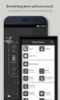
Add an on-screen navigation key to replace or supplement your device's physical back button
Add an on-screen navigation key to replace or supplement your device's physical back button
Vote (136 votes)
Program license Free
Developer ogapps
Version 1.13
Works under Android
Vote
(136 votes)
Developer
ogapps
Works under
Android
Program license
Free
Version
1.13
Pros
- Adds an on-screen Back key that can be repositioned with a press-and-hold
- Can display extra navigation controls (Home, recent-apps) and a notification-bar shortcut
- Button order, shapes, and colors are adjustable
Cons
- Relies on Accessibility Services to provide its navigation features
- Requires being displayed over other apps, which not everyone will want enabled
Back button is a small Android utility that places an on-screen navigation key you can use instead of, or alongside, a device’s physical back control. It is aimed at anyone who finds the system Back action hard to reach, or wants a movable on-screen alternative.
A floating Back key you can put where you want
At its core, Back button adds a floating button that can sit on top of whatever you are doing. The standout detail is how flexible its placement is: you can press and hold the button to reposition it, which makes it easy to keep the Back action within comfortable reach.
More navigation shortcuts, if you want them
Back button is not limited to a single control. It can also show additional on-screen buttons for Home and the recent-apps switcher, and it can provide access to the notification bar. If you decide to display multiple controls, you can change their order, which helps tailor the layout to your habits rather than forcing a fixed arrangement.
Basic personalization without getting complicated
The app includes visual options that keep the overlay from feeling out of place. You can pick from multiple button shapes and adjust button colors, which is useful if you want the controls to be more visible or simply better matched to your wallpaper and theme.
Permissions and practical trade-offs
To perform system-style navigation actions, the app uses Accessibility Services and is designed around being drawn over other apps. That approach makes the feature set possible, but it also means you will be granting elevated access for navigation and overlay behavior. If you are cautious about Accessibility-based tools, this is the main point to weigh before committing.
Pros
- Adds an on-screen Back key that can be repositioned with a press-and-hold
- Can display extra navigation controls (Home, recent-apps) and a notification-bar shortcut
- Button order, shapes, and colors are adjustable
Cons
- Relies on Accessibility Services to provide its navigation features
- Requires being displayed over other apps, which not everyone will want enabled